



If you’ve ever wanted to create high-quality AI-generated images but your computer’s GPU just couldn’t handle the load, you’ll love this. I recently tested the Flux + Kontext + Krea model with Nunchaku optimization, and the results were incredibly realistic — all while running on a low VRAM setup.
In this guide, I’ll share:
- How Flux + Kontext + Krea work together for photorealism
- How Nunchaku makes heavy models run on budget GPUs
- A free downloadable AI workflow that saved me 70% generation time
- Why this setup is a game-changer for artists, creators, and even e-commerce businesses
1. Flux + Kontext + Krea: A New Standard in AI Image Generation
Recently, Flux Kontext teamed up with Krea to release a new AI image model fine-tuned for photorealism and accuracy.
What makes it special:
- Sharper prompt interpretation for more accurate results
- Lifelike textures — especially in skin, fabrics, and lighting
- Versatile style range — from ultra-realistic to stylized photography
📥 Download the Flux.1-Krea-Dev Model: Flux.1-Krea-Dev on HuggingFace
2. How Nunchaku Helps Run Heavy Models on Low VRAM GPUs
The biggest challenge in AI art generation? VRAM limitations. Most high-quality models require 12–24GB VRAM to run smoothly — but Nunchaku changes the game.
Why Nunchaku is a low VRAM lifesaver:
- Optimized quantization reduces model size while maintaining image quality
- Multi-input LoRA aggregation applies multiple stylistic enhancements in one pass
- Better memory management allows smooth generation on GPUs with as little as 6–8GB VRAM
This means creators using mid-range GPUs (or even some laptops) can now generate high-resolution, realistic AI images without constant crashes.
3. The 70% Faster Workflow
While testing, I used this pre-built ComfyUI workflow optimized for Flux + Kontext + Krea + Nunchaku.
📥 Download the Ready-to-Use Workflow: Flux1 Kontext Nunchaku Workflow on CivitAI
📷 Workflow Preview: 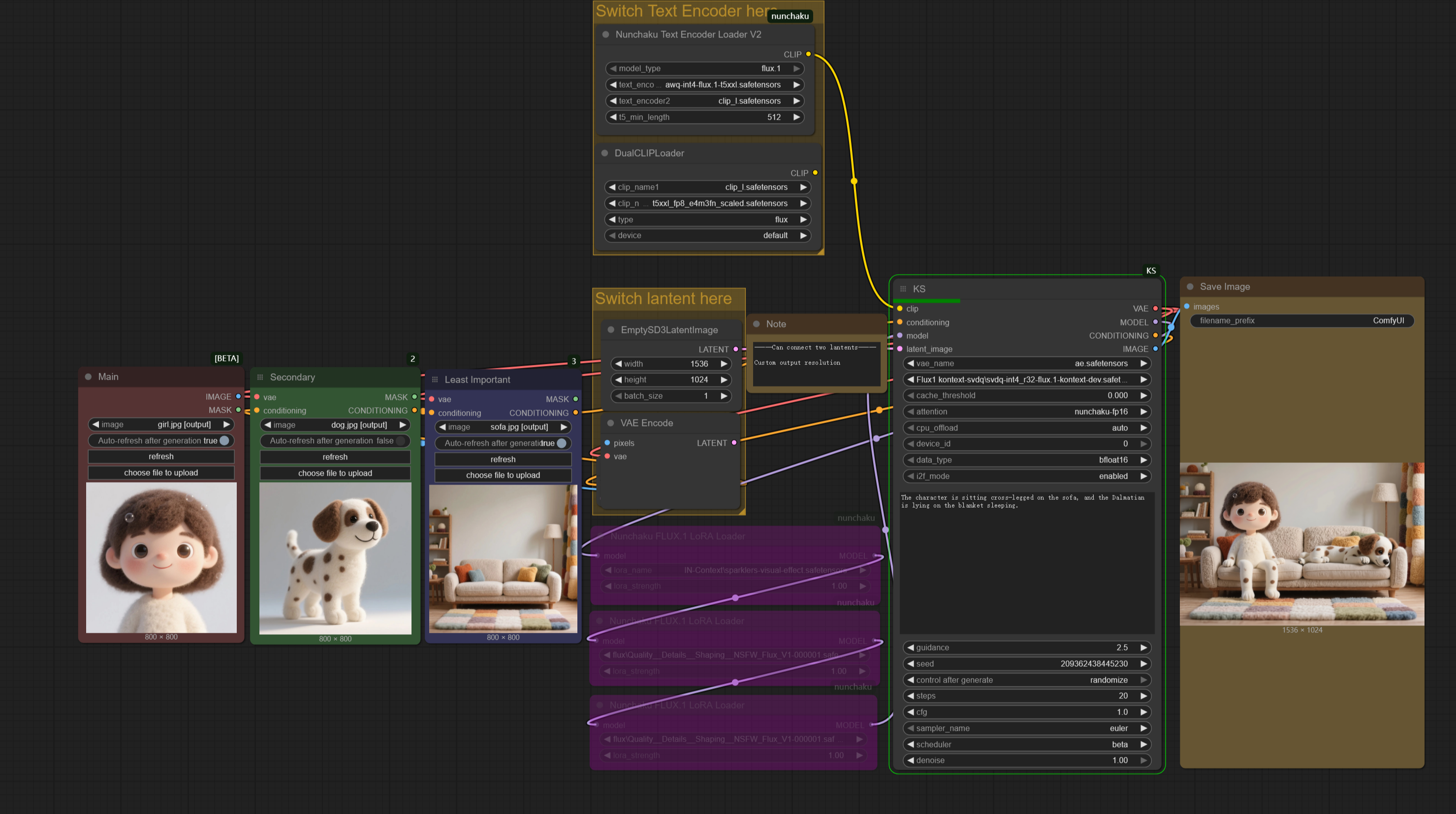
Benefits I noticed:
- 70% reduction in generation time compared to my old process
- Higher output accuracy — fewer retries
- Ability to render at higher resolutions without VRAM errors
4. Step-by-Step: How to Use This Setup
- Download the Flux.1-Krea-Dev model from HuggingFace
- Get the optimized workflow from CivitAI
- Load both into your AI image generation tool (ComfyUI recommended)
- Customize prompts to your desired style
- Generate — and enjoy high-quality results, even on a modest GPU
5. Real-World Applications
While this is exciting for AI hobbyists, it’s also a powerful tool for businesses. For example:
- E-commerce product renders — realistic product images without expensive photography
- Marketing creatives — high-quality visuals for ads and social media
- Prototyping & branding — quick, realistic mockups for clients
If you run an online store and want to explore AI automation for product visuals, we can help you integrate AI tools directly into your business workflow. 📩 Contact us here for a consultation.
6. Final Thoughts
The Flux + Kontext + Krea + Nunchaku stack proves that realism, speed, and accessibility can go hand in hand. You no longer need an expensive GPU to produce studio-quality AI images.
For creators and businesses alike, this workflow means:
- Lower hardware requirements
- Faster creative iteration
- Consistently high-quality output
If you’ve been held back by hardware limitations, now’s the time to try it.